Mobile menus
Mobile Menus
Mobile menus are Joomla! menus, which are available on the mobile site only. In this section, we will see how to convert a web-specific menu into a mobile-friendly menu.
Creating Mobile Menu
Now we will create a mobile-specific menu. Let’s follow the below steps to create one such menu.
- Go to Joomla! administration.
- Go to Menu Manager
- Click “New” to create new mobile menu, fill Title and Menu Type fields (e.g. “Mobile Menu” and “mobilemenu”, correspondingly), and Save result
- Add menu items to new menu. It’s highly recommended to use “System Links/Menu Item Alias” item type to populate mobile menu with aliases to existing (desktop) menu items.
Assigning a Menu to Mobile Site
Here we are going to see how to assign a menu as main menu of the mobile site. We will go through the below process.
Go to Extensions→Module Manager.
Filter by module and choose existing mobile menu module. You can find them by looking position of mj_panel.
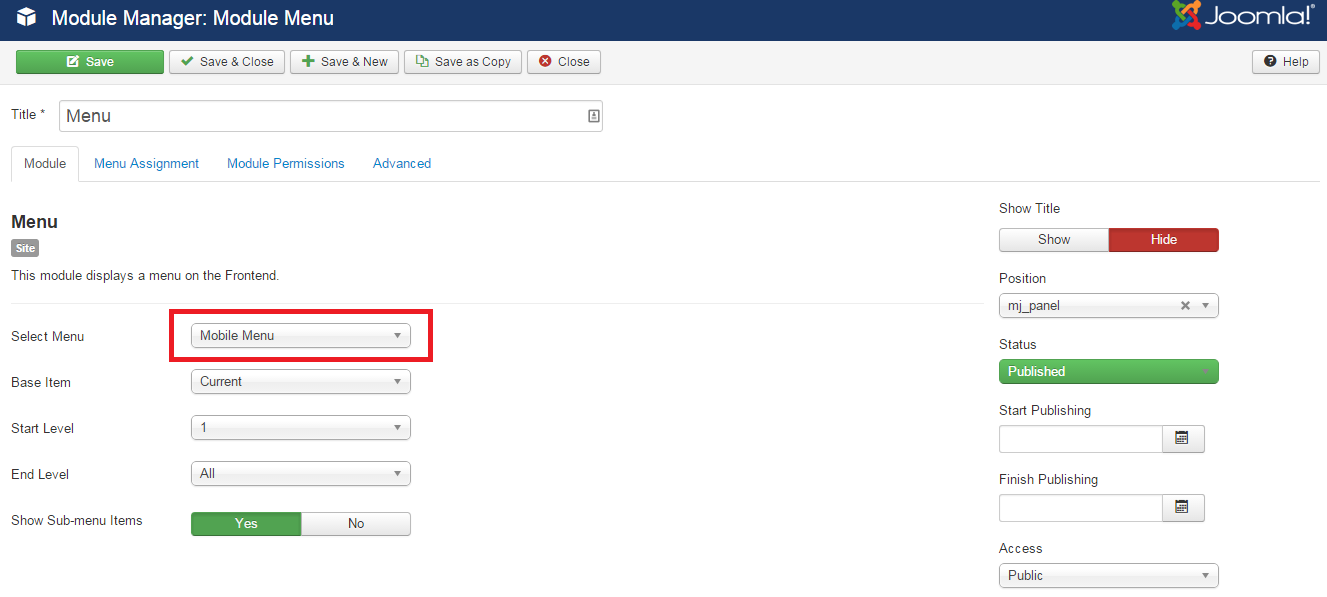
Then click the Menu module.
On right hand, in menu drop down choose Mobile Menu (the menu you just created).